Sascha Henning

PioTime. Wortex. Omnido.

For hours.
Words. Tasks.

Three of my apps. One tracks your time, one gives you a word puzzle every day, and one keeps tasks together with their source.

Get to know the apps What I do for work

My apps

Keep scrolling. Take a closer look.

Each app has a job of its own. Get to know them here and try them right away.

01 / For everyone

PioTime

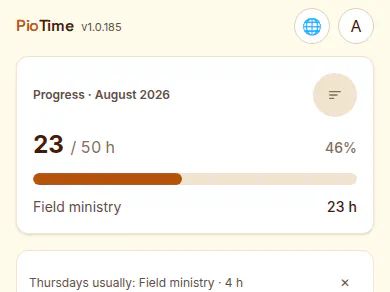
Time tracking for the field ministry — no account, all data stays on your device.

Quick entry
Buttons for your most frequent durations, or a built-in timer, one tap is enough.
Monthly goal & service year
A progress bar for the monthly goal (50, 30, 15 hours or your own), a service-year overview with credits and monthly totals.
What PioTime looks like

free · App Store · Browser · 8 languages

Open PioTime More about PioTime

02 / For everyone

Wortex

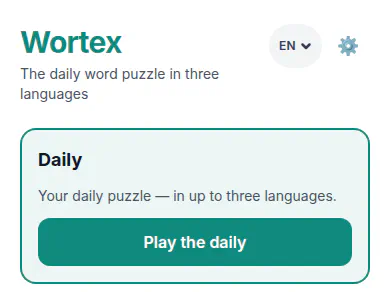
The daily word puzzle — in German, English and Ukrainian.

Daily word
One puzzle per language every day, the same for everyone — with a "par" to compare against.
Training
Playable offline, four difficulty levels from "Relaxed" to "Expert", extra rules like a time limit or strict mode.
What Wortex looks like

free · Browser · 3 languages

Open Wortex More about Wortex

03 / For everyone

Omnido

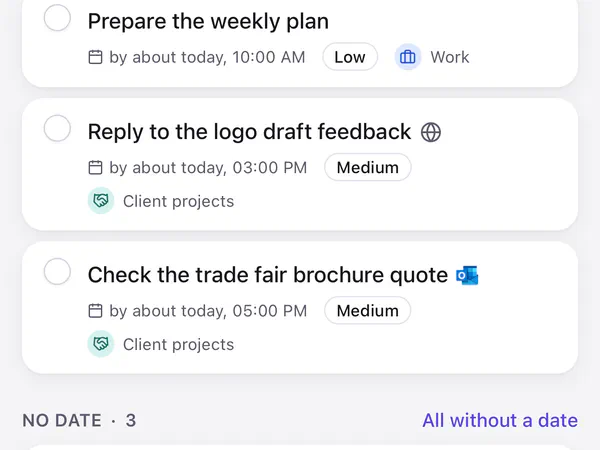
Bring scattered tasks together with AI suggestions and saved sources. As a Mac app and in the browser.

Capture
Select text, press the shortcut, done. Omnido takes the text and its context along, such as the app, the window title or the page address.
Check
The AI suggests a title, description, date and category. Dashed fields still need a check. You change what doesn’t fit and accept the task.
What Omnido looks like

Mac · App Store · Browser · 2 languages

More about Omnido

04 / For everyone

CongPlan

My private project — web app for planning congregation meeting programs.

Browser · own website · 14 languages

Open CongPlan

05 / For teams, access on approval

Shift

Shift planning for volunteer teams: planners build the plan, helpers open a link and see their shifts.

For planners
Sign in with an e-mail address and a login code, no password. With a sidebar on a computer, with bottom navigation on a phone.
For helpers
One link per person and planning. No login, built for the phone.

access on approval · Browser · 2 languages

Open Shift More about Shift

06 / For teams, access on approval

Virtual Office

A self-hosted virtual office: you walk around the rooms, and audio and video come on as soon as you are close enough to someone.

Browser · 7 languages

Open Virtual Office

More in the making

On my workbench.

In progress

Mova

A calm, personal language tutor: daily lesson, flashcards, text conversation and weekly quiz.

In progress

Grand Detour

Browser board game for 2 to 6 players.

Tools

Web Terminal

My terminal in the browser, secured with a passkey and with sessions that keep running in the background. It only runs at my place — hence no link.

Tools

my-secrets

Local credential manager for macOS with an audit log: every read and write is recorded.

See all 10 projects

JASP

Business

As a partner at JASP I advise companies on Microsoft 365, SharePoint and intranets, design architectures and build solutions that pay off. A selection:

Plus, via JASP: intranet consulting, SharePoint / Microsoft 365 / Teams, software architecture & development, automation & workflows, training as well as support & project management.

Sascha Henning

The person behind the apps

Hi, I’m Sascha.

I’m a software architect and a partner at JASP. I advise companies, design architectures and build solutions — pragmatic, fast, self-reliant, from the first whiteboard all the way to production. My standard: software that fits the problem AND pays off economically. By night the time belongs to the home lab and the next side project. If one of the projects interests you, just click it.


LinkedIn jasp.eu